Gemini computer use on Mac: how it works, who gets it
/ Gemini can now click, type and fill in forms across your Mac's apps for you. How computer use works, who gets it, what it costs and the risks to know.
by Hozefa Khety
· 7 min read
Google has given the Gemini app for Mac the ability to use your computer for you. Announced on November 19, 2026, the new computer use feature lets Gemini click, type, open menus and fill in forms across your Mac's apps, local files and websites to finish multi-step jobs, while you keep using your screen and cursor for something else.
It is rolling out first in English in the United States, to paying Google AI subscribers on Apple silicon Macs. Below is how it works, what you need, what it costs, the safety controls Google has built in, and the risks worth knowing about before you hand over the keys. Details and prices checked November 20, 2026, 03:00 IST (November 19, 21:30 UTC).
What is Gemini computer use on Mac?
Computer use turns Gemini from a chatbot that tells you how to do something into an agent that does it. You describe the task in plain language and Gemini works through the steps itself: navigating menus, clicking buttons, typing information and moving between apps until the job is done. Google pitches it at repetitive work that 'normally takes dozens of clicks'.
The key design choice is that Gemini works in an isolated background window rather than taking over your desktop. A live preview of what it is doing appears in your Gemini chat, and Google says your main screen and cursor stay free, so you can keep typing, designing or taking calls while it works. AppleInsider describes this as a separate virtual screen.
Before this update, the Mac app's Task feature (previously called Gemini Spark) could work with local files and connected Google apps such as Gmail and Google Calendar, according to 9to5Google. Computer use extends that to ordinary desktop apps and the web.
What can it do? Google's examples
Google gives four example uses. Creative work: batch colour-grading photos in your design software or setting up complex 3D scenes. Form filling: pulling weights, dimensions and addresses out of local PDFs to fill in multi-box shipping quotes. Presentations: collecting metrics and screenshots from live online dashboards across several regions and building a deck in Google Slides. Reselling: analysing clothing photos in a local folder, researching prices, logging item details and staging listings on resale sites.
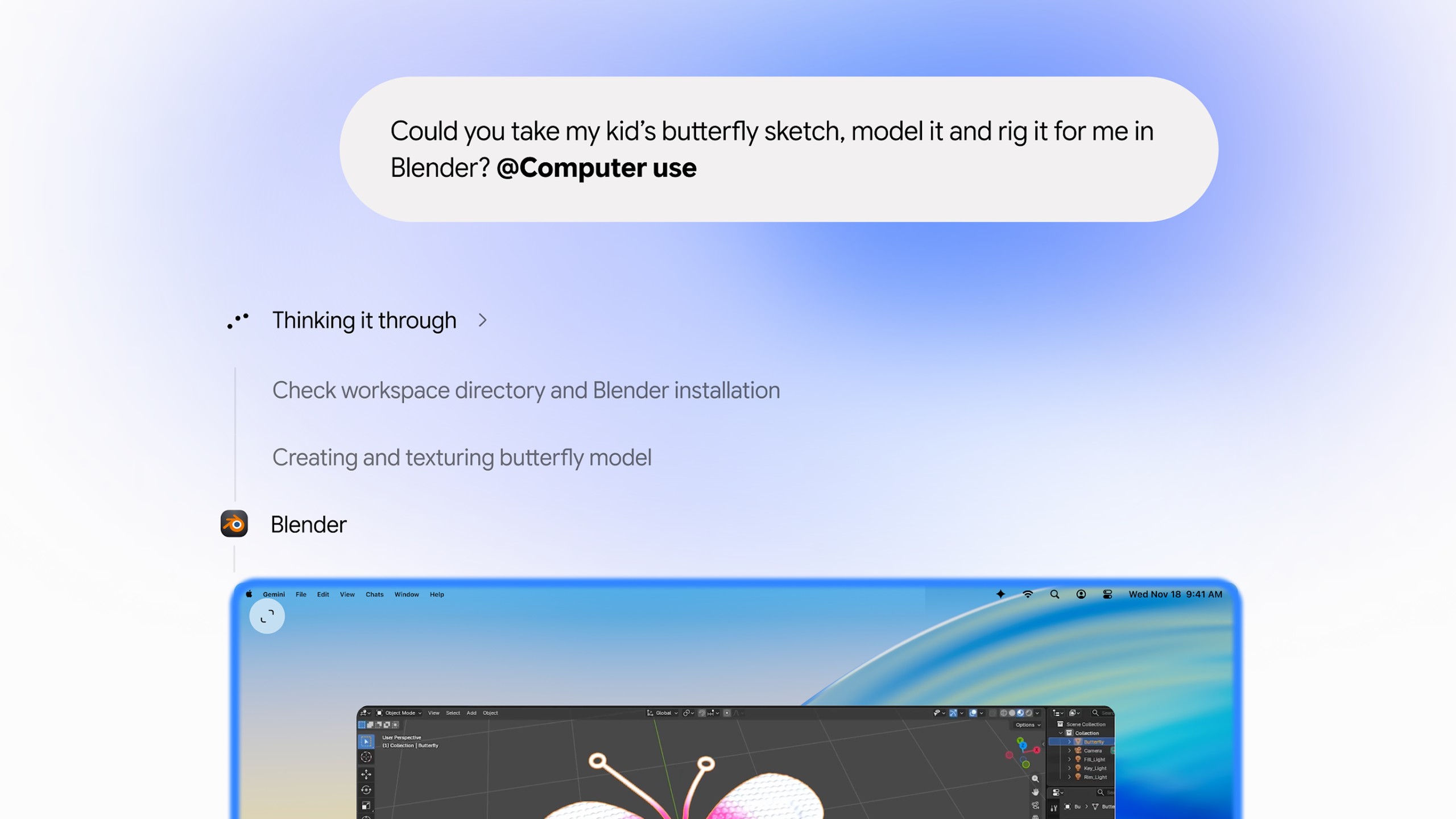
Google's launch demo shows Gemini taking a child's butterfly sketch, modelling and texturing it in Blender, and then turning it into a 3D-printable charm. 9to5Google reports that new Desktop apps, including Blender and Autodesk Fusion, now appear under Customize, then Connectors, alongside the existing Git and Obsidian integrations.
Who can get it, and what does it cost?
Computer use is rolling out in English in the US. Google lists these requirements: a Mac with Apple silicon running macOS Sequoia 15.0 or later, the Gemini app for Mac (a free download from gemini.google/mac), a personal Google account belonging to someone aged 18 or over, and a Google AI Plus, Pro or Ultra subscription.
US prices on Google's subscription page, checked November 20, 2026, 03:00 IST: Google AI Plus is $4.99 a month, Google AI Pro is $19.99 a month, and Google AI Ultra is $99.99 a month (5x the Pro usage limits) or $199.99 a month (20x). The free tier does not include computer use.
One caveat: AppleInsider points out that while Google's announcement names AI Plus, Pro and Ultra, Google's support documentation currently lists only Pro and Ultra for controlling desktop apps. If you are on AI Plus and do not see the option, that may be why. Work and school accounts are not included at launch, and Google has not said when computer use will reach other countries, languages or platforms such as Windows.
The rollout is gradual. Macworld found that a freshly downloaded copy (version 1.147.5.1526) did not have the feature yet, so if it is missing, update the app from its menu and check back later.
How to use Gemini computer use on a Mac
Step 1: Install or update the Gemini app for Mac from gemini.google/mac and sign in with an eligible personal Google account.
Step 2: Turn on computer use when prompted and grant the two macOS permissions it needs, Accessibility and Screen and System Audio Recording, in System Settings if they are not already on.
Step 3: In a chat, describe your task and add @Computer use to the prompt, as 9to5Google and Google's own demo show.
Step 4: When Gemini first needs an app, it asks for permission. AppleInsider reports you can allow it once or choose Always allow, which lets Gemini use that app in future tasks without asking again. You can also keep lists of allowed and blocked apps in Gemini's settings.
Step 5: Watch the live preview in the chat. You can pause or stop the task at any time with one click.
Safety controls Google has built in
Google says you choose which apps Gemini can access, can watch every step live, can pause at any time and approve key actions before they happen. According to 9to5Google, Gemini pauses and hands control back to you for logins and payments, and asks for confirmation before sensitive actions. Google's help pages, as summarised by AI Ping, give examples of actions that always need confirmation, including sending messages, deleting data, sharing sensitive information, purchases and financial transactions, even if you have allowed routine steps automatically.
For changes to your files, Gemini tries to make temporary backups when its backup setting is on. AppleInsider reports that Google warns some apps do not support backups and some changes cannot be undone, and that the backups expire after 24 hours or when you send your next prompt, whichever comes first.
The risks: why some Mac experts say be careful
Letting any AI agent drive your computer carries real risks, and Google's own documentation spells several out, according to AppleInsider. Gemini can use apps that are already signed in to your personal or work accounts, and it can read multi-factor authentication codes that are visible in desktop or messaging apps. Giving it access to code editors or developer tools could let it run shell commands or make wider changes to your files.
The bigger worry is prompt injection: hidden instructions inside a web page, email or document that trick an agent into doing something you never asked for. Google acknowledges that untrusted content in one app could steer Gemini into taking actions in another app it has permission to use. AppleInsider stresses these are documented risks, not evidence that the feature is causing harm, but its advice is to avoid giving an AI agent broad control of your main Mac, especially one with sensitive files or accounts.
Sensible precautions: start with allow-once permissions rather than Always allow, keep password managers, banking, email and developer tools on the blocked list, use it on low-stakes tasks first, and keep your own backups (Time Machine or similar) because Gemini's are short-lived.
How it fits with Apple's macOS 27.3 changes
The launch comes days after Apple added new permission controls in the second developer beta of macOS 27.3 on November 16. AppleInsider and MacRumors report that Apple will let users limit which apps an automation tool can control and which folders an app can see, require approval each time, and show an indicator when one app is controlling another. MacRumors notes that permissions granted before macOS 27.3 is released will carry over without the new explanation screens, so it is worth reviewing what you allow now rather than later.
How it compares with ChatGPT and Claude
Google is not first here. TechCrunch notes that OpenAI, Anthropic and Meta already offer agentic features in their desktop apps, and that Google only this week announced a broader rollout of Gemini Tasks, which can sign in to websites, make purchases and book appointments. What Google adds is tight links to its own services, such as building decks in Google Slides, plus the background window that keeps your cursor free. For many people the deciding factor will be which AI subscription they already pay for.
See more of The Threshold on Google
Add us as a preferred source to see more of our stories in your Top Stories.
Frequently asked questions
What is Gemini computer use on Mac?
It is a new feature in the Gemini app for Mac, announced November 19, 2026, that lets Gemini click, type, use menus and fill in forms across your Mac's apps, local files and websites to finish multi-step tasks in a separate background window.
Who can use Gemini computer use?
It is rolling out in English in the US to personal Google accounts of people 18 and over with a Google AI Plus, Pro or Ultra subscription, on Apple silicon Macs running macOS Sequoia 15.0 or later.
How much does Gemini computer use cost?
It comes with paid Google AI plans. In the US, AI Plus is $4.99 a month, AI Pro $19.99 and AI Ultra $99.99 or $199.99 a month (checked November 20, 2026). Google's support pages currently list only Pro and Ultra for desktop app control.
Is Gemini computer use available outside the US?
Not yet. Google says it is rolling out in English in the US and has not given a date for other countries, languages or platforms such as Windows.
How do I start a computer use task in Gemini?
Update the Gemini app for Mac, grant the Accessibility and Screen and System Audio Recording permissions, then describe your task in a chat and add @Computer use to the prompt. Gemini asks permission the first time it needs each app.
Can I keep using my Mac while Gemini works?
Yes. Gemini works in an isolated background window with a live preview in your chat, so your main screen and cursor stay free. You can pause or stop it at any time.
Is it safe to let Gemini control my Mac?
Google adds app permissions, live previews and confirmations for logins, payments and sensitive actions, but its documentation warns about prompt injection, access to signed-in apps and changes that cannot be undone. Start with low-stakes tasks and block sensitive apps.
Can Gemini undo changes it makes to my files?
Sometimes. Gemini tries to make temporary backups when the setting is on, but some apps do not support them, some changes cannot be reversed, and backups expire after 24 hours or at your next prompt.