How to schedule a WhatsApp message: steps and limits
/ WhatsApp now lets you schedule messages up to 14 days ahead in chats and groups. Here's how to do it, the limits, and why you may not see the option yet.
by Hozefa Khety
· 7 min read
WhatsApp has finally added one of the features its users have asked for most: scheduled messages. You can now write a message whenever you think of it and have WhatsApp send it anywhere from 10 minutes to 14 days later, in both one-to-one chats and group chats. WhatsApp announced the feature on its official blog on November 25, 2026, and it works with text, photos and videos.
There is one catch: the rollout itself is gradual. WhatsApp says scheduled messages are rolling out globally on Android and iPhone over the coming weeks, so the option may not show up in your app yet. Here is how to use it once it arrives, what the limits are, and what we still don't know. Details were checked against WhatsApp's announcement and launch-day reports at 02:58 IST on November 26, 2026 (21:28 UTC, November 25).
How do you schedule a message on WhatsApp?
WhatsApp has built scheduling into the normal send button rather than hiding it in a menu. According to WhatsApp and WABetaInfo, which tracked the feature through testing, the steps are:
1. Open the individual or group chat you want to message.
2. Type your message, or pick the photo or video you want to send.
3. Press and hold the green send button instead of tapping it.
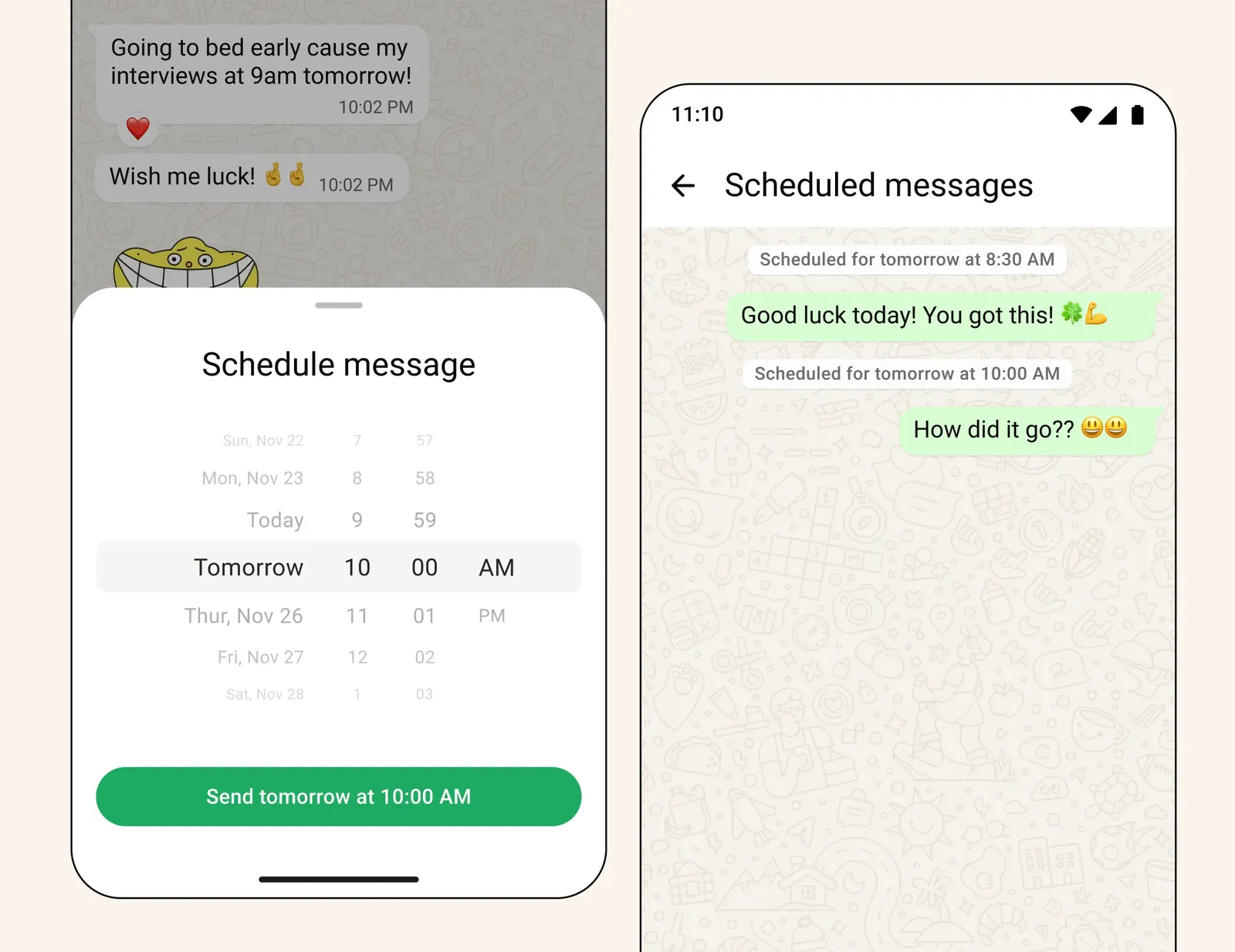
4. In the Schedule message screen, scroll the date and time picker to when you want the message to arrive. The earliest you can pick is 10 minutes from now and the latest is 14 days ahead.
5. Tap the green button at the bottom, which shows the exact delivery time (for example, "Send tomorrow at 10:00 AM"), to confirm.
WhatsApp then shows a note in the chat that the message is scheduled. Only you can see that note. When the time comes, the message is delivered like any other, and WhatsApp says it looks exactly like a normal message to the person receiving it, so they won't know it was scheduled.
How do you see or cancel a scheduled WhatsApp message?
WhatsApp says you can see all the messages you have lined up and delete them before they go out if you change your mind. WABetaInfo reports that scheduled messages for a chat are listed in that chat's info screen (tap the contact or group name at the top of the chat), and that the recipient gets no notification when you delete a scheduled message, so they never know it existed.
Whether you can edit a scheduled message, or move it to a new time, is less clear. WhatsApp's own announcement only mentions deleting. 9to5Google wrote that you can edit as well as cancel, while TechCrunch said it was not clear whether the schedule can be changed. Until WhatsApp's help pages say otherwise, the safe approach is to delete the scheduled message and schedule a new one.
Does your phone need to be on for a scheduled message to send?
No. This is the most useful difference from the workarounds people used before. WhatsApp says a scheduled message will still be delivered at the time you chose even if your phone is switched off or out of battery, and TechCrunch notes it also goes out if you are outside network coverage.
WABetaInfo explains how: once you schedule a message, the app hands it to WhatsApp's servers, which deliver it at the chosen time whether or not your device is online. WhatsApp says scheduled messages stay end-to-end encrypted like all personal messages, so only you and the recipients can read them, and not even WhatsApp can see what they say.
What can you schedule, and what are the limits?
Here is what WhatsApp and the launch reports confirm, as of November 26, 2026:
Timing: from 10 minutes to 14 days ahead. You can't schedule a message for less than 10 minutes away, which WABetaInfo says gives you time to delete it before it goes out.
Chats: individual chats and group chats.
Content: text, photos and videos. WABetaInfo also lists links. 9to5Google reports that voice messages apparently aren't supported, and WhatsApp doesn't list them.
Media: during beta testing, 9to5Mac reported that you could only schedule one photo or video per message, so each media item had to be scheduled separately. WhatsApp hasn't said whether that limit still applies in the final version.
Groups: a scheduled group message only goes to the people who were in the group when you scheduled it. According to WABetaInfo, anyone who joins after that won't receive it, even if they join before the send time.
Platforms: WhatsApp and TechCrunch describe the rollout as iOS and Android. WhatsApp hasn't said whether scheduling will come to WhatsApp Desktop or WhatsApp Web.
Price: free. Scheduled messages are part of the regular WhatsApp app, not the optional WhatsApp Plus subscription or a paid business tool.
Why can't I see the schedule option on WhatsApp yet?
Most likely because it hasn't reached your account yet. WhatsApp says scheduled messages are rolling out globally "over the coming weeks", which means the switch is being flipped for different users at different times, a common approach for big WhatsApp features.
There's no setting to turn it on yourself. The best thing you can do is update WhatsApp to the latest version from the Google Play Store or Apple App Store, then try pressing and holding the send button in a chat now and then. If nothing happens and the message doesn't open a scheduling screen, the feature simply hasn't arrived for you yet.
When did WhatsApp start testing scheduled messages?
WABetaInfo first spotted the feature in WhatsApp's Android beta (version 2.26.40.7) on October 12, 2026, and it reached some iPhone beta testers about 10 days later, according to 9to5Mac. WABetaInfo says WhatsApp had been working on it for months before that. The November 25 announcement is the official public launch, about six weeks after testing began.
How does WhatsApp scheduling compare with iMessage and Telegram?
WhatsApp is late to this. TechCrunch points out that rivals such as Telegram and Signal have offered scheduled messages for a while, and Engadget notes that WhatsApp's sibling app Instagram has let people schedule messages since 2024. Telegram also uses a long press on the send button to schedule a message.
Apple's Messages app on iPhone has a Send Later option, added in iOS 18, that also lets you schedule an iMessage up to 14 days ahead, according to Apple's support pages. So WhatsApp's 14-day limit matches Apple's. The big advantage for WhatsApp is reach: it works the same way on Android and iPhone, in groups, and for people in any country, which matters if you message friends and family across time zones.
What are scheduled messages actually good for?
WhatsApp's own examples are a good guide: wishing someone luck the night before an exam or job interview so the message lands in the morning, or timing a birthday message to arrive at midnight in a friend's time zone rather than yours. TechCrunch adds coordinating work across time zones and sending reminders to a group.
It's also handy for messages you don't want to send late at night. You can write a reply at 1 AM and have it arrive at 9 AM, and because the recipient sees a normal message, they won't know you wrote it in the middle of the night.
The bottom line
Scheduled messages make WhatsApp catch up with Telegram, Signal and iMessage, and the details are sensible: up to two weeks ahead, groups included, delivered even if your phone is off, and still end-to-end encrypted. If you don't see it yet, update the app and give it a few weeks. Press and hold the send button to check. We'll update this article if WhatsApp confirms editing, voice notes or support on Desktop and Web.
See more of The Threshold on Google
Add us as a preferred source to see more of our stories in your Top Stories.
Frequently asked questions
How do I schedule a message on WhatsApp?
Type your message in an individual or group chat, then press and hold the send button instead of tapping it. Pick a date and time in the Schedule message screen and tap the green button to confirm. The message is sent automatically at that time.
How far ahead can you schedule a WhatsApp message?
From 10 minutes up to 14 days ahead. You can't schedule a message for less than 10 minutes from now or more than two weeks away.
Why don't I have WhatsApp scheduled messages yet?
WhatsApp is rolling the feature out globally on Android and iPhone over the coming weeks after its November 25, 2026 announcement, so it reaches accounts at different times. Update WhatsApp to the latest version and try pressing and holding the send button again later.
Will a scheduled WhatsApp message send if my phone is off?
Yes. WhatsApp says scheduled messages are delivered at the chosen time even if your phone is switched off, out of battery or without signal, because the message is held by WhatsApp's servers until it's time to send.
Can the recipient tell that a WhatsApp message was scheduled?
No. WhatsApp says a scheduled message looks like any other message to the person receiving it. Only you see the note in the chat that it's scheduled, and deleting a scheduled message doesn't notify anyone.
Can I edit or cancel a scheduled WhatsApp message?
You can cancel it. WhatsApp says you can see your upcoming scheduled messages, which are listed in the chat's info screen, and delete them before they're sent. WhatsApp hasn't confirmed an edit option, so the safest way to change one is to delete it and schedule a new message.
Can you schedule WhatsApp messages in groups?
Yes. Scheduling works in group chats as well as individual chats. The message only goes to people who were in the group when you scheduled it, not to anyone who joins afterwards.
Are scheduled WhatsApp messages end-to-end encrypted?
Yes. WhatsApp says scheduled messages are end-to-end encrypted like all personal messages, so only you and the recipients can read them, and WhatsApp can't.