X parental controls: how to set up and what parents see
/ X now has parental controls for teens aged 13 to 17. Here's how to link accounts, set a daily time limit, approve followers and what parents can't see.
by Hozefa Khety
· 7 min read
X now has parental controls. On November 25, 2026, X's Safety account announced that parents and guardians of teens aged 13 to 17 can link to their teen's account and set a daily time limit, approve new followers, filter what shows up in the feed and decide who can send direct messages. It is the first time the platform formerly known as Twitter has offered tools like these.
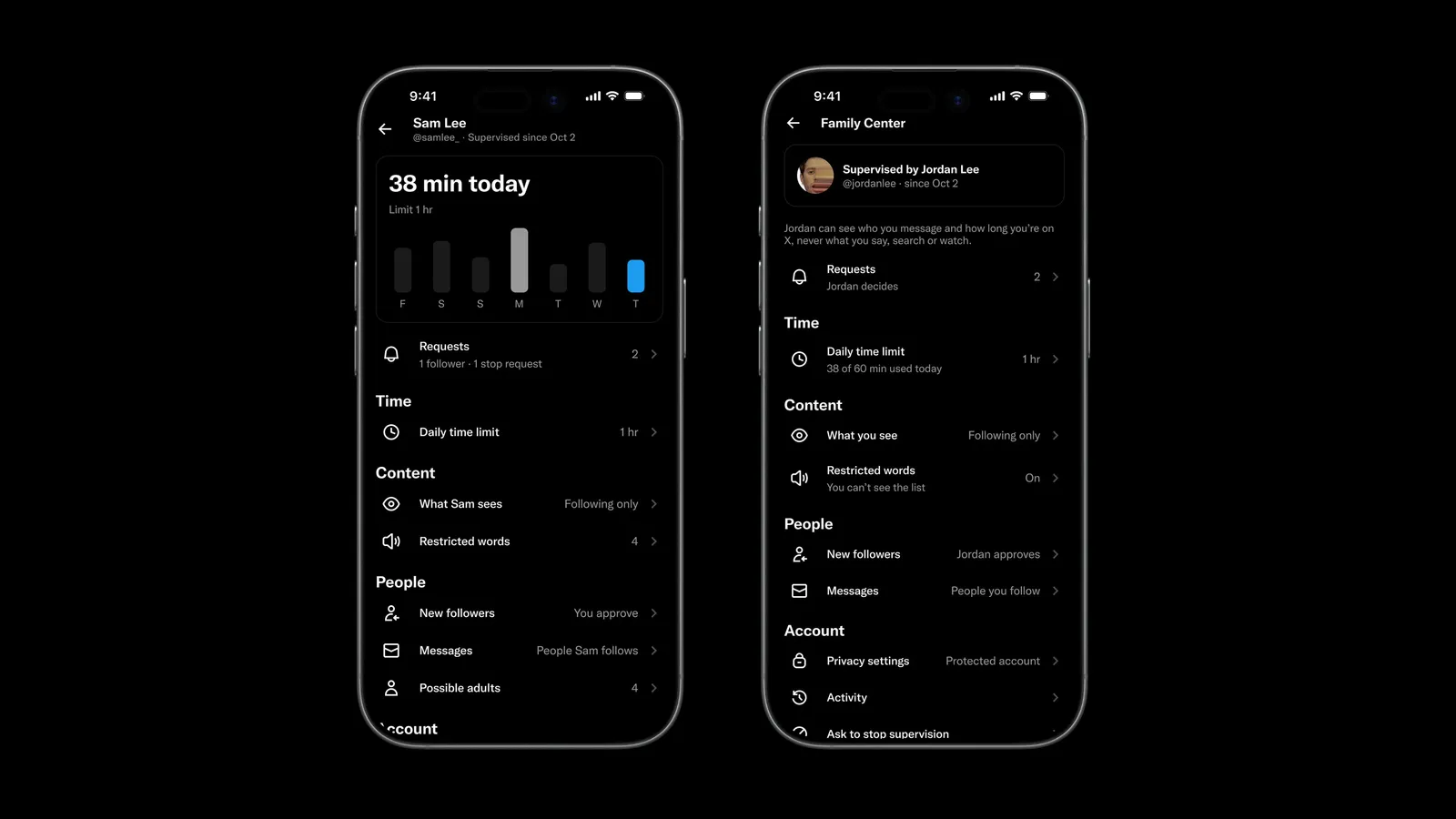
The big difference from a lot of other apps is that the teen has to agree. Supervision only starts when both the adult and the teen accept, the teen can see every change, and parents cannot read their teen's messages. Here is how to set it up, what each control does, and what it does not cover. Details were checked against X's announcement and launch-day reports at 18:54 IST on November 26, 2026 (13:24 UTC). Lead image: X's official Parental Controls screenshots (Image: X).
What are X's new parental controls?
X describes Parental Controls as a set of tools for families with teens aged 13 to 17. The teen keeps ownership of their own account, and a linked parent or guardian gets a dashboard with six main options. According to X's announcement, a parent or guardian can:
1. See how much time their teen has spent on X over the past week, and set a daily limit.
2. Require approval for new followers. Turning this on also makes the teen's account private.
3. Limit For You recommendations and videos to accounts the teen already follows.
4. Filter specific words out of their teen's experience and turn off sensitive media.
5. Control who can send their teen direct messages.
6. See which accounts their teen has chatted with one-on-one, without seeing the messages themselves.
These sit on top of protections X says teen accounts already get by default: a protected mode, restricted sensitive media and no targeted advertising. X also stresses that it is not designed for or promoted to children, and that users must be at least 13, or older where the law requires it.
How to set up parental controls on X
X says linking "starts with the parent or guardian and finishes with the teen", and that both users have to agree. Based on X's announcement and its Help Center guide, as reported by TeslaNorth, Startup Fortune and News9, the steps are:
1. Make sure you have your own X account and are 18 or older. X uses the birth date on each account to decide who can supervise and who can be supervised, so add your birth date first if it's missing. Your teen's account also needs a birth date that shows they are 13 to 17.
2. In your X app, open Parental Controls and choose Get started. X creates an invitation as a QR code and a link.
3. Your teen scans the QR code or opens the link on a device signed in to their own account, then chooses whether to accept.
4. Act quickly. The invitation expires after 72 hours, and creating a new invitation cancels the old link.
5. Once your teen accepts, you can set the daily limit, follower approval, content filters and message settings from your Parental Controls dashboard.
X's official screenshots show the controls in the X mobile app. X has not said in its announcement whether every setting can also be managed on the web.
How does the daily time limit work?
Parents can see their teen's time on X over the past week and set a daily cap. According to X's Help Center, as reported by TeslaNorth and Startup Fortune, the limit is set in 15-minute steps and resets at midnight in the teen's time zone. When the teen reaches the cap, X locks for the rest of the day and shows when the limit resets. If the parent raises or removes the limit, the teen can get straight back in.
In X's own screenshot of the parent view, the dashboard shows a bar chart of daily use with a line such as "38 min today" against a one-hour limit, followed by sections for Time, Content and People.
What can parents not see on X?
X draws a clear line here. In its words, "Parents and guardians cannot read private messages, see searches or viewing history, post as their teen, or access the account." A parent can see which accounts their teen has messaged one-on-one, but not what was said.
X also says "every change is recorded and visible to the teen." On the teen's side, X's screenshot shows a Family Center page that names the supervising adult, explains what they can and cannot see, lists the current settings and includes an option to ask to stop supervision. Startup Fortune, citing the Help Center, says the teen can ask to end supervision but the final decision rests with the parent.
"Supervision on X starts with a handshake and ends automatically when a teen becomes an adult," said Mridul Singhai, product engineering lead at X. "Parents get guardrails, not a window into their teen's private life."
How many teens can one parent supervise?
One parent or guardian can supervise up to five teen accounts. Each teen, though, can be linked to only one adult at a time. That means families where parents live apart, or where a grandparent helps out, will need to decide which adult holds the controls.
Supervision ends automatically when the teen turns 18, so there is nothing to switch off at that point.
Do X's parental controls cover Grok?
X's announcement does not mention Grok, the AI chatbot built into the X app, and Startup Fortune reports that the Help Center page doesn't either. Until X says otherwise, parents should not assume the new controls change what Grok can do for a teen. The daily time limit applies to time on X itself, but X has not said whether the word filters or sensitive media settings apply inside Grok conversations.
That matters because of the timing. The Verge notes that the controls arrive just days after Oregon and Virginia sued over sexualized deepfakes generated by Grok, and after earlier lawsuits and criticism of the chatbot's safeguards. Engadget adds that the new tools are likely also aimed at complying with current and upcoming child-safety laws in several states and countries.
How do X's controls compare with other social apps?
X is late to this. Instagram, TikTok and YouTube have offered parental supervision tools for years, typically with screen-time limits, insight into who a teen follows or messages, and content settings. X's version covers similar ground: time limits, follower approval, message controls and content filters.
What stands out is how much X leans on consent and transparency. Supervision can't start without the teen accepting, the teen sees every change, and message contents, searches and viewing history stay private. Parents who want stricter oversight still need device-level tools such as Apple's Screen Time or Google Family Link, which can limit or block the app entirely.
Is it free and available everywhere?
X's announcement doesn't mention any cost or a Premium subscription requirement; the adult and the teen each need their own X account. X says the feature is "now available," but News9 reports that availability can vary by region. If you don't see Parental Controls yet, update the X app and check again later.
The bottom line
If your teen uses X, the new Parental Controls are worth setting up together. They give you a daily time cap, follower approval, a calmer feed and control over who can message your teen, without reading their messages. Just remember that your teen has to accept the invite within 72 hours, that only one adult can be linked, and that X hasn't said how any of this applies to Grok.
See more of The Threshold on Google
Add us as a preferred source to see more of our stories in your Top Stories.
Frequently asked questions
Does X have parental controls?
Yes. On November 25, 2026, X announced Parental Controls for teens aged 13 to 17. A linked parent or guardian can set a daily time limit, approve new followers, limit recommendations, filter words, turn off sensitive media and control who can send direct messages.
How do I set up parental controls on X?
Open Parental Controls in your own X account and choose Get started. X creates a QR code and a link. Your teen scans the code or opens the link while signed in to their account and accepts. The invitation expires after 72 hours.
Can parents read their teen's messages on X?
No. X says parents and guardians cannot read private messages, see searches or viewing history, post as their teen or access the account. They can see which accounts their teen has chatted with one-on-one, but not the messages.
Does my teen have to agree to X parental controls?
Yes. Linking starts with the parent or guardian and finishes with the teen, and both have to agree before supervision starts. The teen can see every change made to their settings.
How many teens can one parent supervise on X?
One parent or guardian can supervise up to five teen accounts. Each teen can be linked to only one parent or guardian at a time.
How does the X daily time limit work?
Parents set the limit in 15-minute steps, according to X's Help Center as reported by TeslaNorth and Startup Fortune. When the teen hits the cap, X locks until the limit resets at midnight in the teen's time zone, unless the parent raises or removes it.
When does supervision on X end?
Supervision ends automatically when the teen turns 18. A teen can also ask to stop supervision earlier from their Family Center page.
Do X parental controls apply to Grok?
X's announcement does not mention Grok, and reports say the Help Center page doesn't either. Parents should not assume the new controls change what Grok can do for a teen until X confirms it.