How to stop Gemini AI training and keep your chat history
/ Gemini now lets you keep chat history and opt out of AI training, but training is on by default. Here's how to turn it off and how long Google keeps chats.
by Hozefa Khety
· 8 min read
Google has started widely rolling out a Gemini privacy setting that people have asked for since the app launched: you can now keep your chat history and still tell Google not to use your chats to train its AI models. Until now, the only way to keep your Gemini conversations out of training was to switch off your history completely, which also meant losing the ability to go back to old chats.
The catch is that the new training option is switched on by default for adults, so you have to turn it off yourself. Here is exactly where to find it on the web and in the Gemini app, what it does and does not cover, and how long Google now keeps your chats. Settings and wording were checked against Google's own Gemini help pages at 18:58 IST on November 25, 2026 (13:28 UTC).
What changed in Gemini's privacy settings?
Gemini used to have a single switch called Keep activity, on the Gemini Apps Activity page. It decided two things at once: whether your chats were saved so you could pick them up later, and whether Google could use them to train its generative AI models. On November 16, 2026, Google announced it was splitting that switch in two, and 9to5Google reported on November 24 that the new controls are now widely rolling out.
The first new control is called History. It decides whether your chats are saved in your account and for how long. The second sits under the heading "Help train generative AI models with" and has a checkbox called "Chat content including text & attachments". If that box is ticked, Google can use the content of your future chats to train its AI models. Untick it, and your history stays but your future chats are kept out of training.
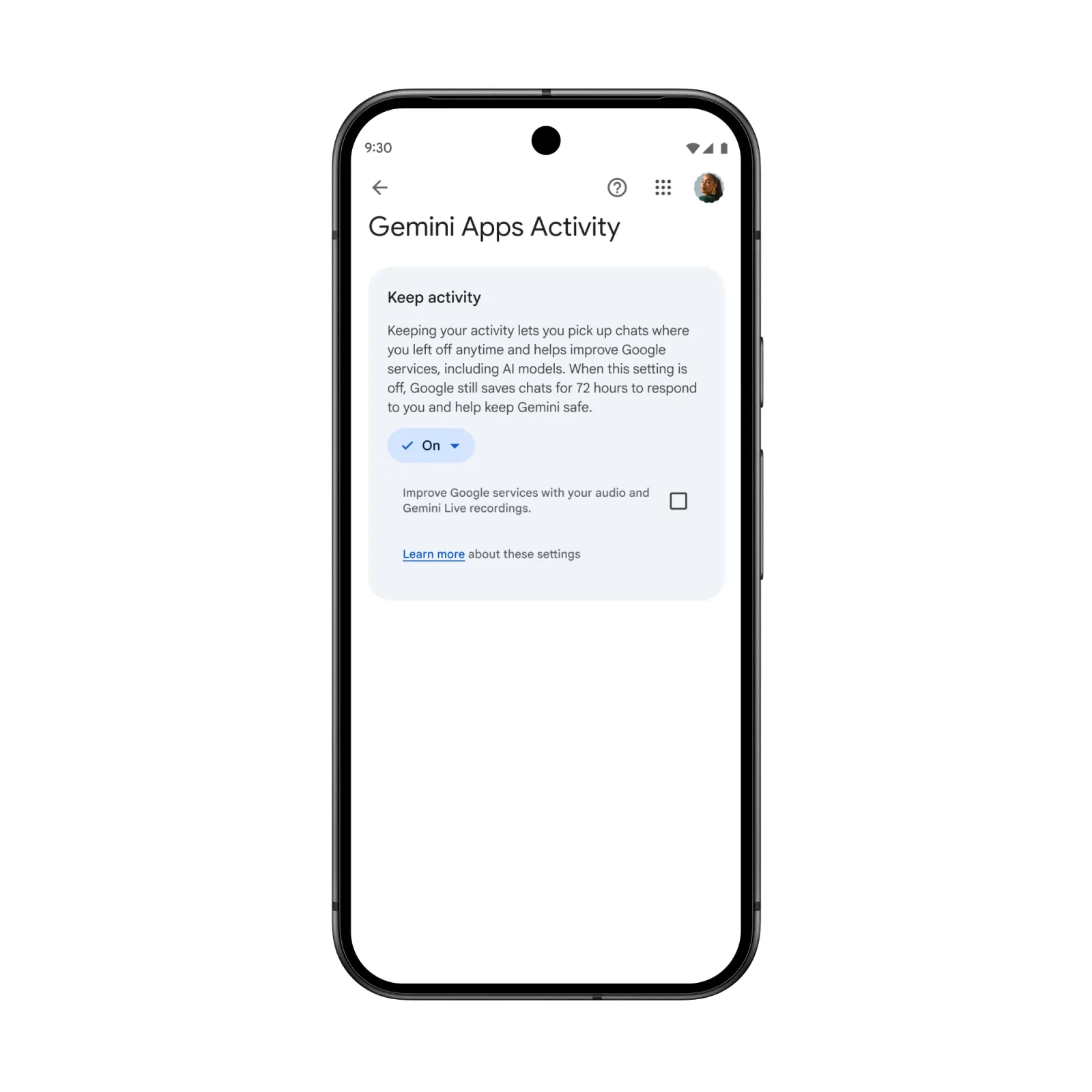
How to stop Gemini training on your chats on the web
On a computer (or any browser), it takes under a minute:
1. Go to gemini.google.com and sign in. 2. Click Settings at the bottom of the side menu, then choose History (some accounts show it as Gemini History at the very bottom of the list). You can also go straight to myactivity.google.com/product/gemini. 3. Make sure History is set to On if you want to keep your chats. 4. Under "Help train generative AI models with", untick "Chat content including text & attachments". 5. Confirm with Turn off.
Once it is off, the setting itself says: "Your future chats won't be used to train generative AI models, unless you provide feedback." That last part matters. If you press thumbs up or thumbs down, or send a report, Google can still use that feedback and the conversation around it.
How to turn it off in the Gemini app on Android and iPhone
In the Gemini mobile app, Google's help page lists these steps: tap Menu at the top, tap Settings at the bottom, then under "Data & privacy" tap History. Untick the box next to the chat content setting and tap Turn off. In the app the box may be labelled "Chat content including text & uploads" rather than "attachments", but it is the same setting.
If you cannot tick or untick either box, your History is probably off. Google says you need History switched on to use these settings. The change applies to your whole Google account, so turning it off on one device covers Gemini on the web, Android and iPhone.
What about voice chats and Gemini Live?
There is a second checkbox on the same page: "Audio and Gemini Live videos & screenshares". Google says this one is off by default, so most people do not need to touch it. If you turned it on in the past, Google can use those recordings to improve its services, including AI models, so it is worth checking.
Note that this box covers the audio and video itself. Written transcripts of your Gemini Live conversations, and files you share during them, fall under the chat content box instead. So to keep Live chats out of training, untick the chat content box as well.
What the new setting does not do
Turning off training is a real improvement, but it does not make your Gemini chats private from Google. According to Google's Gemini Apps Privacy Hub, even with the box unticked, your future chats will still be reviewed and used to improve Google services in other ways, and to protect Google, its users and the public. Chats picked for review are separated from your account before they go to reviewers, and they are kept for up to three years.
It also only works going forward. Chats that were already reviewed are kept for up to three years even if you delete them or change the setting later, and anything already used for training stays that way. Google's privacy hub also notes that the setting only covers Gemini: other settings, such as your Search history, may keep saving data from other Google services. Google says Gemini chats are not used to show you ads by default.
How long does Google keep Gemini chats now?
With History on, Google's default is to delete your Gemini history automatically after 18 months. You can change that to 3 months or 36 months, or keep it indefinitely, and you can delete individual chats or everything at any time from the same History page.
The bigger change is for people who switch History off. Before this update, Google said chats made with History off were kept for 72 hours. Now Google says future chats will still be saved for around two months, even with History off, and used to respond to you, process feedback and protect its users, with help from human reviewers. The same two-month window applies to Temporary Chats. TechCrunch reports that a Google spokesperson said this retained data is used strictly for safety and security, to investigate complex abuse, and will not be used for AI training or product improvement.
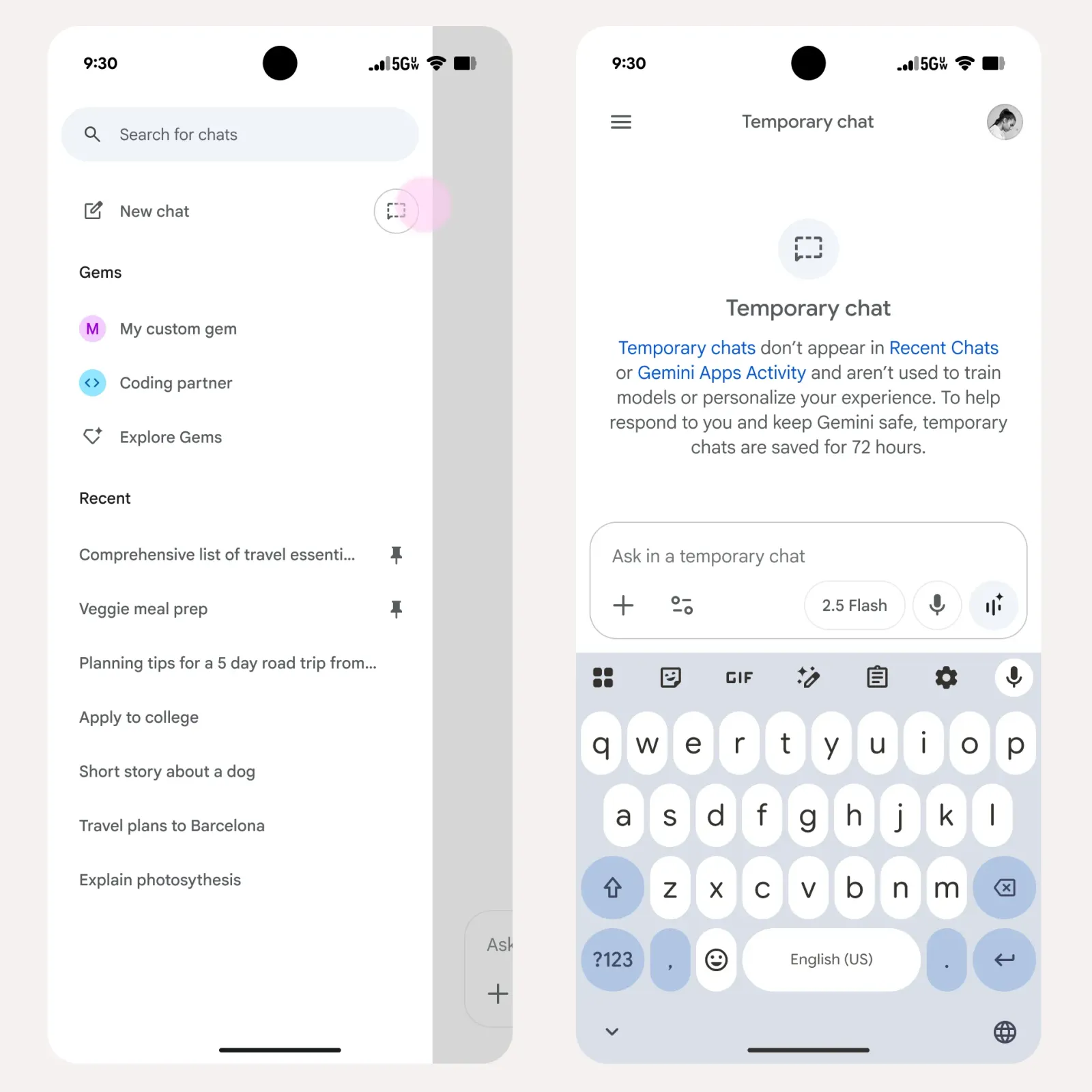
Should you turn History off or use Temporary Chat instead?
For most people, the best setup is now History on with the chat content box unticked. You keep your past chats, you can search them, and your future conversations stay out of AI training. Turning History off no longer buys you much extra privacy, because Google still keeps those chats for about two months. It also switches off most Connected Apps; Google's help page says only a handful, such as Messages, Phone and WhatsApp, keep working.
Temporary Chat is still useful for one-off questions you do not want Gemini to remember or use for personalisation. Google says temporary chats are not used to train its AI models. Just remember they are no longer gone after three days.
How does this compare with ChatGPT and Claude?
ChatGPT and Claude have long let you opt out of training without losing history. As PCWorld notes, in ChatGPT you go to Settings, then Data Controls, and in Claude to Settings, then Privacy, and switch off the option to help improve the models. Gemini is catching up on that front.
On retention, Google now keeps this data the longest of the three. TechCrunch reports that OpenAI says it may keep ChatGPT temporary chats for up to 30 days, and Anthropic keeps Claude incognito chats for 30 days by default. Google's "around two months" is roughly double that.
Who gets the new Gemini setting?
Google says the changes are rolling out globally in the Gemini app over the coming weeks, and it is emailing users about them. If you do not see the separate training checkbox yet, check again in a few days. If you had Keep Activity turned off before, both new settings start off, so your chats are already out of training. If you had it on, your History stays on and the training box starts ticked.
Work and school accounts are different. Google says Gemini History for those accounts is controlled by your Google Workspace administrator, so you may not be able to change it yourself.
The bottom line
If you use Gemini with a personal Google account, open Settings, then History, and untick "Chat content including text & attachments". It is the single most useful Gemini privacy change you can make, it does not cost you your chat history, and it is on by default. Just keep in mind that Google still keeps and may review your chats for safety, now for around two months even with History off, so avoid sharing anything truly sensitive with any AI chatbot.
See more of The Threshold on Google
Add us as a preferred source to see more of our stories in your Top Stories.
Frequently asked questions
How do I stop Gemini from training on my chats?
On gemini.google.com, open Settings, then History (or go to myactivity.google.com/product/gemini). Keep History on if you want your chats saved, then under "Help train generative AI models with" untick "Chat content including text & attachments" and confirm with Turn off. Checked 18:58 IST on November 25, 2026 (13:28 UTC).
Can I keep my Gemini chat history and turn off AI training?
Yes. Since Google split the old Keep Activity setting, History and AI training are separate. You can leave History on and untick the chat content box, so your chats stay saved but future chats are not used to train generative AI models unless you send feedback.
Is Gemini AI training on by default?
Yes, for adults. Google's help page says "Chat content including text & attachments" is on by default if you are over 18. The separate "Audio and Gemini Live videos & screenshares" setting is off by default. If you had Keep Activity off before the change, both new settings start off.
How do I turn off Gemini training in the app?
In the Gemini app on Android or iPhone, tap Menu, then Settings, then History under Data & privacy. Untick the chat content box (it may say "text & uploads") and tap Turn off. The change applies to your whole Google account.
Does turning off training stop Google from reading my Gemini chats?
No. Google says your future chats will still be reviewed and used to improve its services in other ways and to protect users, with help from human reviewers. Reviewed chats are separated from your account and kept for up to three years.
How long does Gemini keep chats if History is off?
Around two months, up from 72 hours before this update. Google says those chats are used to respond to you, process feedback and protect users. A Google spokesperson told TechCrunch this data is used only for safety and security and not for AI training.
Are Gemini Temporary Chats used for training?
No. Google says temporary chats are not used to train its AI models and do not appear in your history, but they are now kept for around two months for safety and security reasons.
Why can't I see the new Gemini training setting?
Google is rolling it out globally over the coming weeks, so it may not have reached your account yet. You also need History switched on to change the boxes, and work or school accounts are managed by the Google Workspace administrator.